
Mt.Lightning
Bingo Card [BINGO:C]


This eco-friendly app can be used as a replacement for paper bingo cards.
You can automatically generate bingo card numbers as many times as you like.
You can play in conjunction with the [BINGO:M] app, which allows you to draw bingo games and manage bingo cards simultaneously.
MAIN
Number QR Code
You can obtain bingo cards issued by the separate app "BINGO:M" by scanning their QR code.
Number Auto
Automatically generate and keep bingo cards.
Let's Bingo!
Once you have obtained bingo cards via QR code or automatic generation, you can use them.
Number Delete
Delete bingo cards you own.
Setting
You can change the screen design.

QR CODE


Scan the QR code on a bingo card issued by the separate app "BINGO:M."
Simply open your camera and scan the QR code to get your hands on a bingo card.
AUTO
Bingo cards will be automatically created and kept.
You can recreate the automatically created bingo cards as many times as you like by tapping the screen.

Let's bingo!
Once you have a bingo card via "QR code" or "auto-create," you can use that bingo card.
Mark a number by pressing and holding it.

delete
You can delete a bingo card you own by pressing and holding the button.
Once you delete a bingo card, you'll be able to get a new one using the QR code or auto-create option.

Settings screen
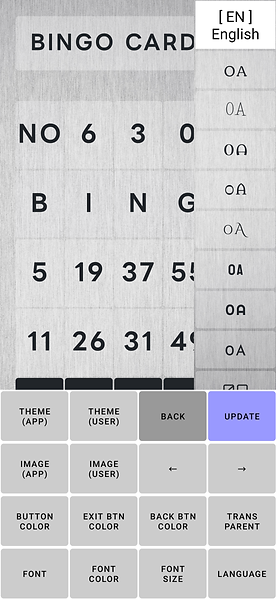
Theme (Standard Set)
Changes to the theme built into the app.
Theme (User Registration)
Long-press to save the current settings.
Short-press to apply the registered settings.
Back
Returns to the main screen.
Register
Saves the settings.
Background Image (Internal Image)
Sets an image built into the app as the background.
Background Image (External Image)
Use this when using an image outside of Capri.
← / →
Adjusts the brightness of the image.
Button Color (Basic, Exit, Back Buttons)
Replaces with a color sample.
Applies the selected color to the button.
Button Transparency
Replaces with a button transparency sample.
Applies the selected transparency to the button.
Font
Replaces with a font sample.
Applies the selected font to the screen.
Font Color
Replaces with a color sample.
Applies the selected color to the font.
Font Size
Replaces with a font size sample. The selected size will be reflected in the font.
Language
You can change the language to English, Korean, Japanese, or Chinese.