
Mt.Lightning
Bingo Machine [BINGO:M]


This app creates and manages bingo cards and holds bingo game draws.
This app can significantly reduce the burden on bingo game organizers.
Bingo cards can be received using the separate app [BINGO:C].
If you have paper bingo cards, you can use them in conjunction with the paper bingo cards.
You can use it as a pure lottery machine without registering bingo cards, but by registering and using bingo cards, the bingo card count will be calculated at the same time as the bingo draw, preventing accidental winnings and participants from missing out, allowing the bingo game to proceed smoothly.
This app has a screen design change function, so you can change the screen to suit the atmosphere of your event.
Main
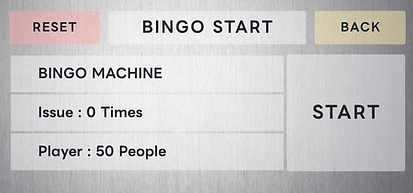
Bingo Start
Displays the start screen for the bingo game.
Card To Player
Displays the bingo card lottery screen.
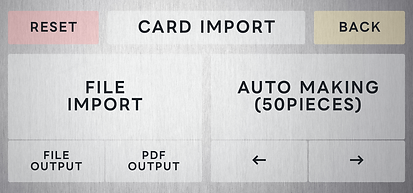
Card Import
Displays the automatic bingo card creation screen.
A backup function is also available.
Card Edit
Displays the edit screen for bingo cards.
You can also register new cards instead of automatically creating them.
Setting
Displays the screen for changing the screen design.

Card creation
Reset
Resets the bingo cards.
Resets the issuance information distributed to participants.
Does not reset the bingo game lottery results.
Back
Returns to the main screen.
File Import
Deletes the bingo cards and imports a file.
Resets the issuance information distributed to participants.
Does not reset the bingo game lottery results.
File Output
Exports bingo card data to a CSV file.
PDF Output
The registered bingo card will be output as a PDF.
Auto Making
Deletes and automatically creates bingo cards.
Resets the issuance information distributed to participants.
Does not reset the bingo game lottery results.
← / →
Changes the number of cards to be randomly created.
The number can be changed from 50 to 250 in increments of 50.


■Card Data Sample
0001,01,02,03,04,05,16,17,18,19,20,31,32,--,34,35,46,47,48,49,50,61,62,63,64,65
0002,03,04,05,06,07,18,19,20,21,22,33,34,--,36,37,48,49,50,51,52,63,64,65,66,67
0003,05,06,07,08,09,20,21,22,23 ,24,35,36,--,38,39,50,51,52,53,54,65,66,67,68,69
0004,07,08,09,10,11,22,23,24,25,26,37,38,--,40,41,52,53,54,55,56,67,68,69,70,71
0005,09,10,11,12,13,24,25,26,27,28,39,40,--,42,43,54,55,56,57,58,69,70,71,7 2,73
0006,11,12,13,14,15,26,27,28,29,30,41,42,--,44,45,56,57,58,59,60,71,72,73,74,75
0007,AA,12,13,14,15,26,27,28,29,30,41,42,--,44,45,56,57,58,59,60,71,72,73,74,75
0008,75,12,13,14,15,26,27,28,29,30,41,4 2,--,44,45,56,57,58,59,60,71,72,73,74,75
0009,11,11,13,14,15,26,27,28,29,30,41,42,--,44,45,56,57,58,59,60,71,72,73,74,75
■Card Data Layout
- Card number, B1 lottery number, B2 lottery number, ~, O4 lottery number, O5 lottery number
■Notes
- Set N3 to "--".
- Zeros are not required before each number.
- If the lottery number is set to a non-numeric value, it will be imported as 0.
- Please correct this on the card editing screen.
- If the lottery number is set to a value outside the range, it will be imported as 0.
Please correct the number on the card edit screen.
- Even if there are duplicate lottery numbers, they will be imported as is.
- Please correct the number on the card edit screen.
- If the card number is not a number, the import will be canceled.
- If there is a duplicate card number, the import will be canceled.
- If there are not enough items, the import will be canceled.
- If there are too many items, they will be imported as is.
Card Fixes
Back
Returns to the main screen.
Valid / InValid
You can disable or enable bingo cards.
All / Normal / Error / Invalid
Switches the bingo card displayed.
New
You can create a new bingo card.
Edit
You can edit the displayed card.
← / →
Switches the bingo card displayed.
New
Enter the card number of the bingo card you want to register.
If the card number you enter is already registered, an input error will occur.
If there is no problem with the card number, you can enter the lottery number.
Select the camera icon to automatically enter the lottery number using the camera.
*Due to the recognition system and the font and design of paper bingo cards, some cards may be difficult to recognize, so please use this as an added feature.
Valid / InValid
Disable or enable a registered bingo card.
Bingo cards that are disabled will not be included in the bingo card lottery.
If you disable a card that has already been drawn and distributed, it will be excluded from real-time tallying during the bingo game.


Edit
You can change the lottery numbers.
You can automatically enter lottery numbers using the camera.
Note: Some cards may be difficult to recognize due to the recognition system or the font and design of the paper bingo cards. Please use this as an added bonus feature.
Settings
Theme (Standard Set)
Applies the settings registered in the app.
Theme (User Registration)
Long press to save the current settings.
Short press to apply the registered settings.
Background Image (Internal Image)
Applies the image registered in the app.
Background Image (External Image)
Applies your own image.
← / →
Adjusts the brightness of the image.
Button Color (Basic, Exit, Back Buttons)
Switches to color samples.
Applies the selected color to the button.
Button Transparency
Switches to button transparency samples.
Applies the selected transparency to the button.
Font
Switches to font samples.
Applies the selected font to the screen.
Font Color
Switches to color samples.
Applies the selected color to the font.
Font Size
Switches to font size samples.
Applies the selected size to the font.
Language
Changes to English, Korean, Japanese, or Chinese.
Back
Returns to the main screen.
Register
Save your settings.

Card issuance
Check
Displays a screen where you can check the status of your bingo card draw.
Back
Returns to the main screen.
Let's Shuffle
Draw a bingo card.


Let's Shuffle
Once a bingo card is drawn, the card number and QR code will be displayed.
This QR code can be read using the separate app [BINGO:C].
Issue confirmation
Card Issue Reset
This does not reset the bingo cards.
This resets the issue information distributed to participants.
This does not reset the bingo game lottery results.
Issued / Unissued
Changes the type of card displayed on the left side of the screen.
Issued cards are displayed in the order they were issued. The last bingo card drawn is displayed at the bottom, so even if you accidentally close the card issuing screen after drawing, you can still check it on this screen.
Back
Returns to the main screen.
Card No.
Tap the card number to display the QR code for that card.
Use this when you want to scan it again in [BINGO:C].
QR Code
Displays a QR code that can be read using the separate app [BINGO:C].

Bingo begins
Reset
This does not reset the bingo cards.
It does not reset the issuing information distributed to participants.
It resets the bingo game lottery results.
Back
Returns to the main screen.
Bingo Name
Tap the bingo name to change the bingo name.
Start
Displays the bingo game screen.
Number of Draws
Displays the number of draws in the bingo game.
If you pause a bingo game, you can check how far you have progressed.
Participants
Displays the participants (number of bingo cards) participating in the bingo game in progress.

Bingo Game
Bingo
Displays the number of people who have achieved bingo in the current bingo game.
Tap to display a list of eligible cards.
Reach
Displays the number of people who are in reach in the current bingo game.
Tap to display a list of eligible cards.
Other
Displays the number of people who are not in reach or bingo.
Tap to display a list of eligible cards.
Let's Bingo!
Draw a bingo lottery.
History
The history displays the results of the last five draws.
Tap History to display the history list.
Back
Returns to the main screen.

Bingo List
This screen displays the cards that resulted in a bingo.
You can check how many times it took to reach bingo and how many times it took to get a bingo.
Back
Returns to the bingo game screen.
Card Number
Card details are displayed on the left side of the screen.

Reach List
This screen displays cards currently in reach.
You can check how many times you've reached reach.
Back
Returns to the Bingo game screen.
Card Number
Card details are displayed on the left side of the screen.

Waiting list
This screen displays cards that have not been awarded a bingo or reach.
Back
Return to the Bingo game screen.
Card Number
Card details are displayed on the left side of the screen.

History
Mode
Switch the display method.
- Lottery results by slot number
- Lottery results by draw order
Back
Return to the Bingo game screen.

